




|
|
|
K.C. Magic Data Box 21081 Saskatoon Sask S7H 5N9 Canada
|
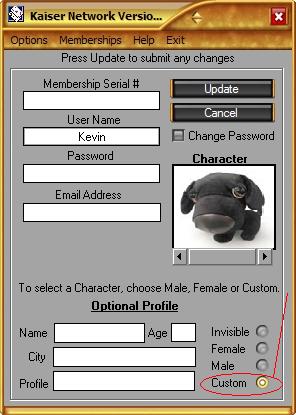
Custom Character Here you can select a personal picture to be used as a character while playing. Use a picture of yourself, dog, cat or any other type of avatar found on the net such as in the example picture below.
Limitations:
The picture you use must follow these guidelines: They must be clean, no nudity, non-offensive. (use common sense) Anyone that does not follow the above rules will be BANNED permanently without explanation. This feature was designed to be fun so lets keep it that way. If you are unsure about the image email it to me or post it on the Forum for others to judge. To select a Custom Character press Edit User from the login screen Then press "Custom" located at the bottom right
You will be able to see the picture selected and how it will look as a character.
Depending on the speed of your computer this may take a few seconds to upload the file to the Kaiser Website.
Visit the following websites for more Avatars to use http://www.msnavatars.net/avatars http://www.freemsnavatars.com/ Tip: For more Avatars just search on Google for "Free Avatars" or you may use actual pictures of yourself. To download an Avatar from a website in most cases, you would right click on the image and choose "Save" and place it somewhere you can find it after its on your computer. Please note that downloading software to create or use Avatars from websites is not recommended because of programs called "Adware". If you download a "FREE" software off any avatar page then chances are it uses Adware that displays advertisements on your computer. Note: All Image files are stored on the Kaiser Website and a copy is also placed in the Data folder. When you Host or Join a room, your Custom Character is loaded from your computer. So its faster. When another player chooses a Custom Character, in order for you to see it, the game downloads it from the Kaiser Website to display on your computer. The files are stored in Data\temp\ as the user's name. The game will load that file first before downloading a newer copy. If the image cannot be downloaded you will see "Image Not Found"
If you see this message then click and choose "Refresh Character". If the Kaiser Website is down for any reason all custom images will show this. You can also choose "Refresh Characters" located under Options. |
|
Computer Requirements: Windows 98, 2000, NT, ME, XP (95 not supported) 23mb hard drive space Pentium II 300 MHz or AMD K6-2 CPU or better. 64 Mb RAM or higher 800 x 600 graphic resolution-16 bit color or higher video Note:640 x 480 will not work Internet connection is required using Microsoft TCP. High Speed Internet connection preferred Dialup Connection will be slow and not recommended.
Looking for Kaiser II the previous version sold in stores?
Kaiser is a Registered Trade Mark Copyright 1996 Online Kaiser Card Game Network 7 Day Free Trial Software Download Online Kaiser Card Game Network 7 Day Free Trial Software Download Online Kaiser Card Game Network 7 Day Free Trial Software Download Online Kaiser Card Game Network 7 Day Free Trial Software Download Online Kaiser Card Game Network 7 Day Free Trial Software Download Online Kaiser Card Game Network 7 Day Free Trial Software Download Online Kaiser Card Game Network 7 Day Free Trial Software Download Online Kaiser Card Game Network 7 Day Free Trial Software Download Online Kaiser Card Game Network 7 Day Free Trial Software Download
|




 A new boxed version of Kaiser Network will
be sold in stores later this year.
A new boxed version of Kaiser Network will
be sold in stores later this year.